
Cloud Deploy Hook Integrations
If you host your theme repository on Cloudflare Pages, Vercel, Tencent Cloud EdgeOne, or Netlify, you can utilize Deploy Hook Trigger Mode.
In this setup, pushing updates to your private content repository triggers an HTTP POST request to your cloud provider's Deploy Hook endpoint, automatically initiating a remote build and sync.
1. Cloudflare Pages Setup Recommended
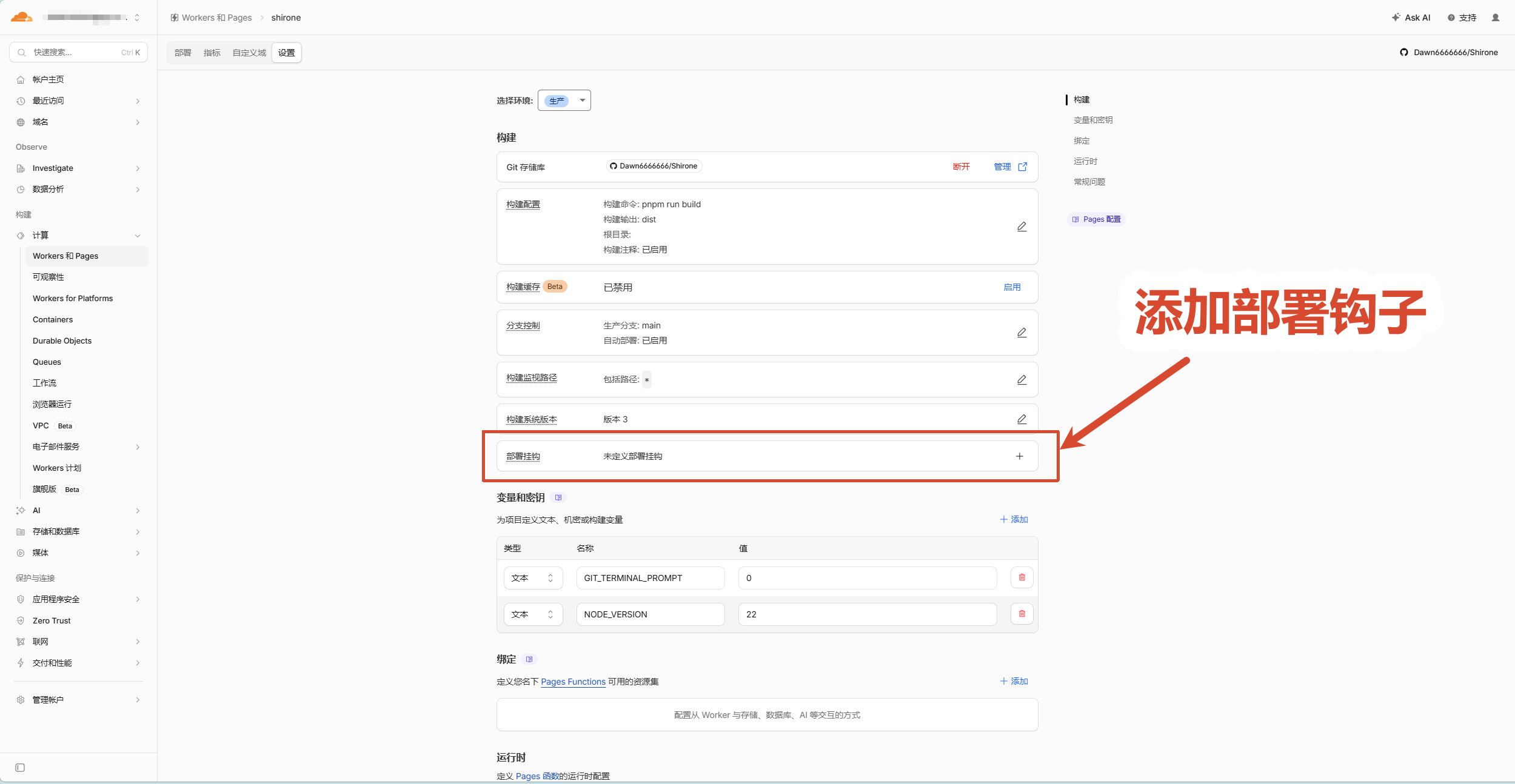
Create Deploy Hook in Cloudflare Pages
- Log in to Cloudflare Dashboard -> Workers & Pages;
- Select your project -> Settings -> Builds & deployments;
- Scroll to Deploy hooks and click Add deploy hook;
- Deploy hook name: e.g.,
content-push; - Branch to build: Select main;
- Click Add hook and copy the generated URL.
Configure Environment Variables in Cloudflare Pages
Go to Settings -> Environment variables:
- CONTENT_REPO_URL: Private Git URL with Token:
https://x-access-token:YOUR_ACCESS_TOKEN@github.com/YOUR_USERNAME/my-blog-content.git - Build command:
pnpm content:sync && pnpm build
- CONTENT_REPO_URL: Private Git URL with Token:
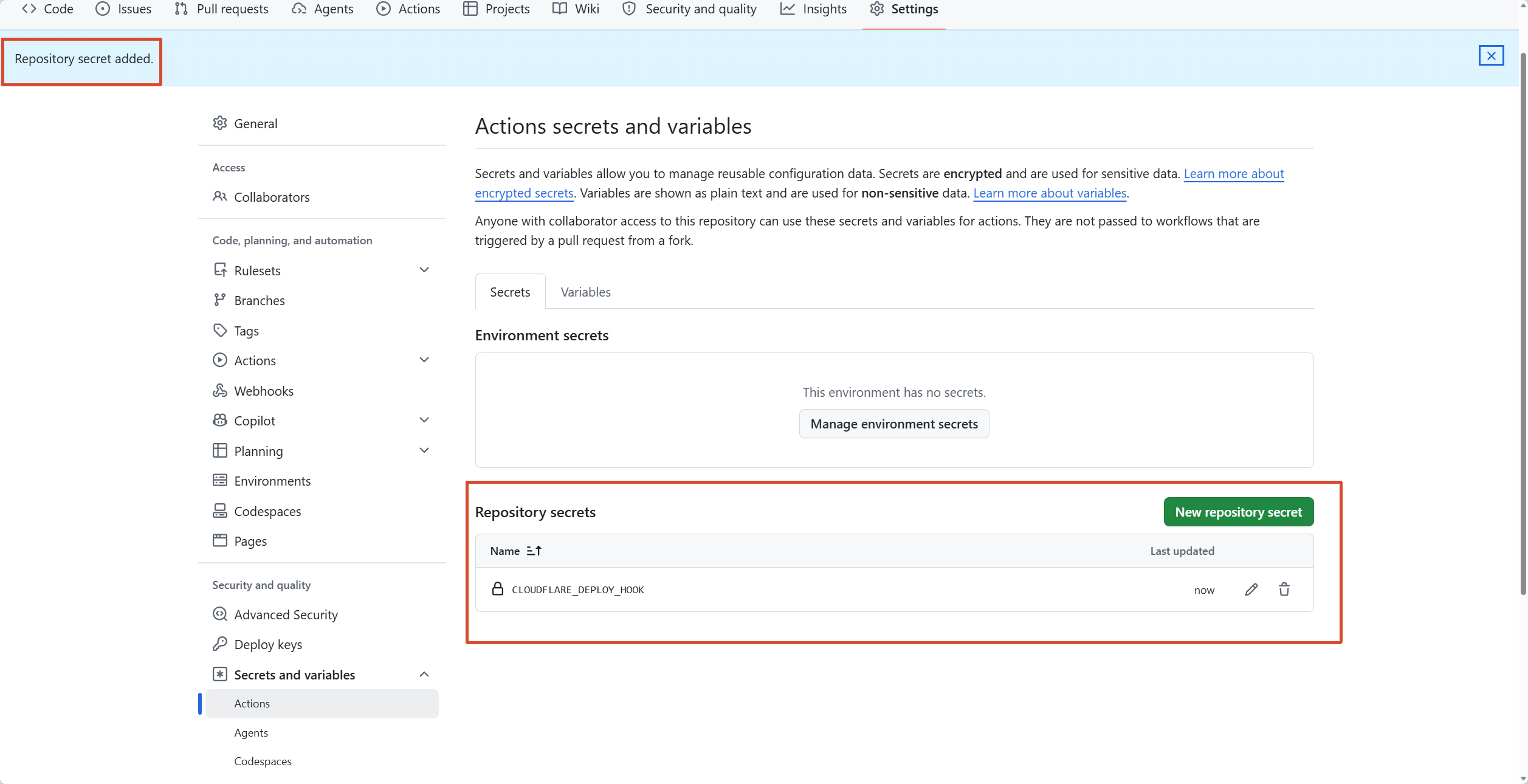
Configure Secret in Private Content Repository
- In your content repository, go to Settings -> Secrets and variables -> Actions;
- Click New repository secret;
- Name: CLOUDFLARE_DEPLOY_HOOK;
- Secret: Paste the Cloudflare Deploy Hook URL;
- Click Add secret.
Add Trigger Workflow in Content Repository
Create
.github/workflows/trigger-cloudflare.yml:name: Trigger Cloudflare Pages Build on: push: branches: [main] workflow_dispatch: jobs: deploy-hook: runs-on: ubuntu-latest steps: - name: Call Cloudflare Deploy Hook env: CLOUDFLARE_DEPLOY_HOOK: ${{ secrets.CLOUDFLARE_DEPLOY_HOOK }} if: ${{ env.CLOUDFLARE_DEPLOY_HOOK != '' }} run: | curl -s -S -X POST "${{ env.CLOUDFLARE_DEPLOY_HOOK }}"
2. Vercel Setup Popular
Create Deploy Hook in Vercel
- Log in to Vercel -> Select project -> Settings -> Git;
- Scroll to Deploy Hooks;
- Hook Name:
content-update; - Branch:
main; - Click Create Hook and copy the URL.
Configure Environment Variables in Vercel
Go to Settings -> Environment Variables:
- CONTENT_REPO_URL:
https://x-access-token:YOUR_TOKEN@github.com/YOUR_USERNAME/my-blog-content.git - Build Command:
pnpm content:sync && pnpm build
- CONTENT_REPO_URL:
Configure Secret in Content Repository
Under Settings -> Secrets and variables -> Actions:
- Name: VERCEL_DEPLOY_HOOK
- Secret: Paste the Vercel Webhook URL.
3. Tencent Cloud EdgeOne Setup Fast
Create Deploy Trigger in EdgeOne
- Log in to EdgeOne Pages -> Project Settings -> Build & Deploy -> Deploy Hooks;
- Add hook for
mainbranch and copy URL.
Configure Environment Variables in EdgeOne
- CONTENT_REPO_URL: Git URL with Access Token;
- Build Command:
pnpm content:sync && pnpm build.
Configure Secret in Content Repository
Under Settings -> Secrets and variables -> Actions:
- Name: EDGEONE_DEPLOY_HOOK
- Secret: Paste the EdgeOne Webhook URL.
4. Netlify Setup
Create Build Hook in Netlify
- Go to Site configuration -> Build & deploy -> Continuous deployment;
- Under Build hooks, click Add build hook;
- Select
mainbranch and copy the Webhook URL.
Configure Secret in Content Repository
Under Settings -> Secrets and variables -> Actions:
- Name: NETLIFY_DEPLOY_HOOK
- Secret: Paste the Netlify Webhook URL.
Deploy Secret Reference Table
| Platform | GitHub Secret Name (Strict Match) | Trigger Type |
|---|---|---|
| Cross-Repo CI (Recommended) | DISPATCH_TOKEN Recommended | Dispatches GitHub Actions in theme repo for full build & font subsetting |
| Cloudflare Pages | CLOUDFLARE_DEPLOY_HOOK Edge | Sends POST request to Cloudflare Deploy Hook |
| Vercel | VERCEL_DEPLOY_HOOK Global | Sends POST request to Vercel Deploy Hook |
| Tencent Cloud EdgeOne | EDGEONE_DEPLOY_HOOK APAC | Sends POST request to EdgeOne Deploy Hook |
| Netlify | NETLIFY_DEPLOY_HOOK General | Sends POST request to Netlify Build Hook |
Next Steps
- Head to Troubleshooting & FAQ: View permission diagnosis, config overrides, and build error resolutions
Copyright
Copyright Ownership:matsuzaka-yuki
License under:Attribution 4.0 International (CC-BY-4.0)